

Cashflow is all about the management of money going in and out from all business activities.
In Ezynk, we classify cashflow in 3 broad categories: Cash, Accounts Receivable (AR), and Accounts Payable (AP).
If you are new to accounting, then you might wonder what AR and AP is.
Accounts Receivable (AR) is when you already made a sale by delivering goods and/or services, but will only receive the cash payment before a specified future date. In short, it’s issuing an invoice but not receiving payment yet.
Accounts Payable (AP) is the exact opposite. You received goods from your suppliers but will only need to pay before a specified future date. AP is receiving an invoice from supplier but yet to make a payment.
Cash In / Cash Out (CICO)
There are a total of 5 types of transactions you can make in Ezynk. Essentially, all cash movements are basically cash moving in and out of accounts (both banks and physical cash) and places, changing hands. Thus, in Ezynk, we call money transactions Cash In / Cash Out, or CICO for short.
The 5 transaction types in CICO are:
- Cash In
- AR Settlement
- Cash Out
- AP Settlement
- Cash Transfer
You can refer to the Ezynk cashflow flowchart below to see where each transaction fits in.
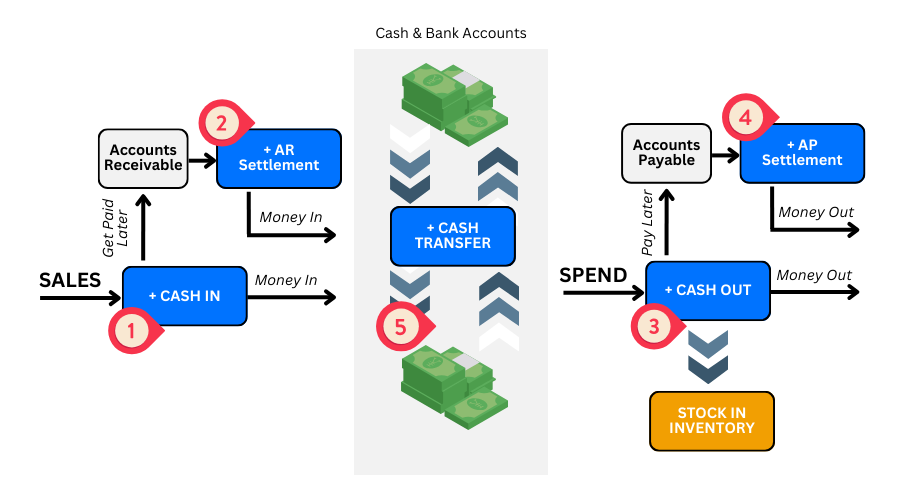
1 – Cash In
‘Cash In’ entries handles inbound money.
You create ‘Cash In’ entries when:
- You receive money from an activity immediately (e.g. monthly rent for subletting out a small part of your shop to another business)
- You log a future payment to you in ‘Accounts Receivable’ (e.g. already delivered goods and invoice to client but agreed to give credit to client to settle payment in 30 days)
2 – AR Settlement
When cash is received for settling money owing to you from your ‘Cash In’ entry earlier, we create an ‘AR Settlement’ entry. The ‘AR Settlement’ entry will then reduce the ‘Accounts Receivable’ and bank in cash into your designated account, by the same amount.
3 – Cash Out
‘Cash Out’ entries are the exact opposite of ‘Cash In’: instead of handling inbound money, it handles outbound money.
You create ‘Cash Out’ entries when:
- You pay for an activity immediately (e.g. buying office supplies at the store and paid in cash)
- You log a future payment in ‘Accounts Payable’ (e.g. receiving goods and invoice from supplier but only required to settle payment in 30 days)
You can also stock in on your inventory for your products and/or your components with the ‘Cash Out’ entry. Ezynk performs a dual action in inventory as you create your ‘Cash Out’ entry.
4 – AP Settlement
When cash is paid for settling money you owed to others from your ‘Cash Out’ entry earlier, we create an ‘AP Settlement’ entry. The ‘AP Settlement’ entry will then reduce the ‘Accounts Payable’ and deduct cash from your designated account, by the same amount.
5 – Cash Transfer
‘Cash Transfer’ entries are used when transferring money between your cash and/or bank accounts. It can be the banking in of cash, or moving cash between stores, or transferring from one bank account to another. Do note that all ‘Cash Transfer’ entries are for internal transactions only. For external transactions, it’s inbound and outbound money movement and is classified as ‘Cash In’ and ‘Cash Out’ entries.